

How Does a P1.667 Fine-Pitch LED Display Deliver High-Definition Visual Performance?
2026-11-03
Article Summary
A P1.667 Fine-Pitch LED Display is designed for environments where image clarity, detailed content, and close-range viewing are essential. With a pixel pitch of just 1.667 mm, this display technology can deliver high-resolution images, smooth graphics, and readable text in professional indoor applications. However, choosing the right LED display involves more than comparing pixel pitch. Buyers also need to evaluate viewing distance, brightness, color performance, cabinet construction, maintenance access, installation conditions, and long-term operating costs.
This guide explains how P1.667 LED displays work, what technical specifications matter, how to select a suitable configuration, and how to maintain consistent display performance. It also highlights practical considerations for project managers, system integrators, commercial buyers, and AV professionals.
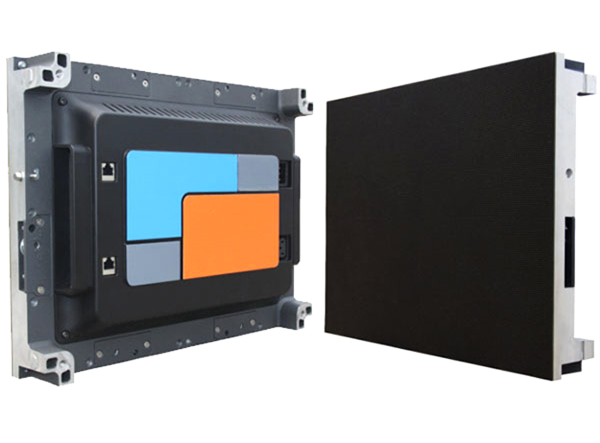
1. What Is a P1.667 Fine-Pitch LED Display?
A P1.667 Fine-Pitch LED Display is an LED screen with a pixel pitch of 1.667 millimeters. Pixel pitch refers to the center-to-center distance between two adjacent pixels. In this configuration, the distance between neighboring pixels is relatively small, allowing more pixels to fit into a given screen area.
Each pixel typically consists of red, green, and blue LED elements. These primary colors combine at different intensity levels to reproduce a wide range of colors, images, videos, and text. The relatively dense pixel arrangement makes P1.667 displays suitable for indoor environments where viewers may stand close to the screen.
Understanding the Pixel Density
Pixel pitch directly affects resolution. For a display with a 1.667 mm pitch, the approximate pixel density is:
Pixels per square meter = 1,000,000 ÷ (Pixel Pitch × Pixel Pitch)
For P1.667:
1,000,000 ÷ (1.667 × 1.667) ≈ 359,856 pixels per square meter.
This high pixel density allows detailed visual content to appear more continuous and refined when viewed from relatively short distances. It is especially valuable for applications involving presentations, data visualization, video playback, and detailed graphics.
Typical Product Characteristics
- Pixel pitch: 1.667 mm.
- Application: Primarily professional indoor display environments.
- Image presentation: High pixel density and detailed visual output.
- Content support: Text, presentations, videos, graphics, and real-time information.
- System configuration: Modular LED cabinets or panels, depending on the product design.
2. How Does P1.667 Pixel Pitch Improve Image Quality?
Image quality is one of the most important considerations when purchasing an LED display. A smaller pixel pitch places pixels closer together, reducing the visible gaps between individual pixels and helping create a more integrated image.
Sharper Details at Close Viewing Distances
In meeting rooms, control centers, and exhibition spaces, viewers may sit or stand relatively close to the screen. A display with a larger pixel pitch can make individual pixels more noticeable under these conditions.
The P1.667 configuration provides a denser pixel arrangement, helping fine text, charts, interface elements, and detailed images appear clearer when viewed from an appropriate distance.
Smoother Graphics and Text
Fine-pitch technology can improve the presentation of thin lines, small fonts, and detailed graphics. This is particularly useful for professional environments that display technical drawings, monitoring dashboards, financial data, or presentation slides.
More Flexible Content Presentation
A high-resolution LED wall can display different types of content across a large screen area. Depending on the controller and system configuration, users may present multiple information sources simultaneously, arrange content windows, or switch between different visual layouts.
Pixel pitch is only one factor in image quality. Grayscale performance, refresh rate, color calibration, LED consistency, processing capability, and signal compatibility should also be evaluated before placing an order.
3. Key Technical Specifications Buyers Should Evaluate
Comparing technical specifications helps buyers determine whether a P1.667 LED display can meet their project requirements. Product configurations vary between manufacturers, so buyers should request an official specification sheet rather than assume that all P1.667 products offer identical performance.
| Specification | What It Means | Why It Matters |
|---|---|---|
| Pixel Pitch | 1.667 mm between adjacent pixel centers | Determines pixel density and influences suitable viewing distances. |
| Pixel Density | Approximately 359,856 pixels/m² | Indicates how much visual information can be represented per unit area. |
| Brightness | Measured in nits or cd/m² | Determines screen visibility under different indoor lighting conditions. |
| Refresh Rate | Measured in Hz | Important for smooth video presentation and camera recording performance. |
| Grayscale | Describes the number of distinguishable intensity levels. | Affects tonal transitions and detail in darker or brighter images. |
| Viewing Angle | Horizontal and vertical viewing range | Helps maintain consistent visibility across different seating positions. |
| Cabinet Dimensions | Physical dimensions of each modular unit | Influences installation planning, screen size, and transportation. |
| Maintenance Method | Front or rear service access, depending on design | Determines maintenance convenience and required installation clearance. |
Brightness and Indoor Lighting
Brightness should match the environment. An indoor conference room generally has different lighting requirements from a bright retail showroom. Excessive brightness may cause visual discomfort, while insufficient brightness can reduce visibility.
Buyers should confirm the recommended operating brightness and whether the system supports brightness adjustment.
Refresh Rate and Camera Compatibility
For applications involving live broadcasting, video conferences, or professional camera recording, refresh rate and camera compatibility deserve particular attention. A display should be tested with the intended camera equipment whenever possible.
Color Consistency and Calibration
Uneven color performance between modules can create visible differences across a large LED wall. Ask the manufacturer about calibration procedures, module consistency, replacement module matching, and quality inspection standards.
4. Where Are P1.667 LED Displays Commonly Used?
The combination of fine pixel spacing and modular installation makes P1.667 LED displays suitable for a variety of professional indoor environments.
Corporate Conference Rooms
Modern meeting rooms require clear presentation screens for video conferences, financial reports, presentations, and collaborative discussions. A P1.667 display can provide detailed images for participants sitting relatively close to the screen.
Control Rooms and Monitoring Centers
Control rooms often display multiple information sources, including operational dashboards, maps, surveillance feeds, and real-time system data. A high-density LED wall can help operators view detailed information across a large visual surface.
Broadcasting and Production Studios
Professional studios use LED screens for virtual backgrounds, visual effects, program graphics, and production environments. Screen performance, color consistency, refresh behavior, and camera compatibility are important factors when selecting a display for these applications.
Retail and Commercial Showrooms
Retail businesses use digital displays to present product information, promotional videos, brand messages, and interactive content. Fine-pitch LED technology can help deliver attractive visual experiences in indoor commercial spaces.
Exhibition Halls and Experience Centers
Exhibitions and experience centers frequently require large-format visual presentations. Modular LED systems can be configured to meet different screen dimensions and installation requirements, subject to the available cabinet design.
5. How to Choose the Right P1.667 LED Display
Selecting an LED display is a project decision rather than simply a product purchase. Buyers should evaluate the installation environment, content requirements, system compatibility, and future maintenance needs before confirming a configuration.
Measure the available installation area and determine the desired screen width and height. Consider wall dimensions, viewing positions, installation restrictions, and the physical cabinet structure.
For a screen with a pixel pitch of 1.667 mm, the approximate resolution can be calculated by dividing the physical screen dimensions in millimeters by 1.667.
For example, a screen measuring approximately 4,000 mm wide and 2,250 mm high would have an estimated resolution of:
- Horizontal pixels: 4,000 ÷ 1.667 ≈ 2,400.
- Vertical pixels: 2,250 ÷ 1.667 ≈ 1,350.
This represents an approximate resolution of 2400 × 1350 pixels. Actual dimensions and resolution depend on the cabinet and module configuration.
Consider how close the audience will be to the screen. A fine-pitch display is particularly useful when detailed content must remain visually integrated at shorter distances. However, the final choice should be confirmed through an actual viewing assessment or sample demonstration.
Check indoor temperature, ventilation, humidity, dust exposure, power supply, and available installation space. Environmental requirements should match the manufacturer's specifications.
Confirm whether the LED display supports the required video inputs, processors, control software, computer systems, and content management workflow. Compatibility is essential for avoiding unexpected integration costs.
Ask about warranty coverage, spare parts, replacement procedures, technical documentation, installation guidance, and after-sales support. A reliable support arrangement can reduce operational risks throughout the product lifecycle.
6. Installation Considerations for Reliable Performance
Even a high-quality P1.667 LED display requires proper installation. Incorrect structural planning, unstable power delivery, insufficient ventilation, or poor module alignment can affect system performance.
Structural Planning
The installation structure must support the total weight of the display and associated equipment. Wall-mounted, suspended, and freestanding installations may require different structural solutions.
Before installation, verify the cabinet dimensions, mounting requirements, load-bearing capacity, and service access arrangements.
Power Supply and Electrical Safety
Power requirements should be calculated using the manufacturer's maximum and average power consumption specifications. The electrical system should provide suitable circuit protection, grounding, and cable capacity.
All electrical installation work should be completed by qualified professionals in accordance with applicable local regulations.
Ventilation and Temperature Management
Heat management is important for electronic display equipment. Ensure that the installation space provides adequate airflow and that ventilation openings are not obstructed. Follow the manufacturer's operating temperature recommendations.
Module Alignment and Calibration
LED cabinets and modules should be installed with consistent alignment. After assembly, technicians should inspect seams, module positioning, brightness uniformity, color consistency, and signal connections.
Signal and Control Configuration
Test all signal sources, processors, receiving cards, and control software before handing over the system. Confirm that the display operates correctly with the actual content and equipment used by the customer.
7. Maintenance Practices That Extend Display Life
Regular maintenance helps protect display quality and reduces the likelihood of unexpected downtime. Fine-pitch LED displays contain numerous electronic components, so careful inspection and proper handling are essential.
Routine Cleaning
- Follow the manufacturer's cleaning instructions.
- Switch off and isolate equipment when required before cleaning.
- Use approved cleaning materials and methods.
- Avoid excessive pressure on LED surfaces.
- Prevent liquids from entering electronic components.
Regular Performance Inspection
Inspect the display for abnormal pixels, uneven brightness, color differences, loose connections, and unexpected flickering. Early identification of problems can simplify troubleshooting.
Check Cooling and Electrical Systems
Inspect ventilation paths, cooling components, power supplies, and cable connections according to the recommended maintenance schedule. Any electrical repair should be handled by qualified personnel.
Keep Spare Modules and Components
For important commercial installations, maintaining compatible spare modules, power supplies, receiving cards, and other critical components can help reduce downtime.
Ask your supplier to provide a maintenance manual, troubleshooting guide, component replacement instructions, and recommended spare-parts list before the project is delivered.
8. P1.667 Fine-Pitch LED Display vs. Other Pixel Pitches
Different pixel pitches serve different project requirements. A smaller pixel pitch generally provides higher pixel density for the same physical screen size, but it may also increase product cost and require more detailed installation and maintenance considerations.
| Pixel Pitch | Approx. Pixel Density | General Application Considerations |
|---|---|---|
| P1.25 | 640,000 pixels/m² | Very high pixel density for applications requiring extremely detailed close-range viewing. |
| P1.5 | 444,444 pixels/m² | Suitable for projects requiring higher resolution at short viewing distances. |
| P1.667 | Approximately 359,856 pixels/m² | A fine-pitch solution for professional indoor applications and detailed visual content. |
| P1.86 | Approximately 288,930 pixels/m² | Offers a different balance of pixel density, viewing requirements, and project budget. |
| P2 | 250,000 pixels/m² | Suitable for many indoor applications with somewhat greater viewing distances. |
Note: Pixel density figures are theoretical calculations based on square pixel spacing. Actual product specifications, module arrangements, and available resolutions may vary.
Is P1.667 Always the Best Choice?
Not necessarily. A display with a smaller pixel pitch may offer greater image detail, but this does not automatically make it the most cost-effective solution for every project.
For example, a large screen viewed from a greater distance may not require the same pixel density as a control-room display viewed at close range. Buyers should balance image requirements, viewing conditions, screen dimensions, and total project budget.
9. Common Purchasing Mistakes to Avoid
Choosing an LED display based only on its advertised pixel pitch can result in technical mismatches and unnecessary expenses. Consider the following common purchasing mistakes before confirming an order.
Focusing Only on Pixel Pitch
Pixel pitch is important, but buyers should also review brightness, refresh rate, grayscale, color consistency, cabinet design, and processing compatibility.
Ignoring Installation Conditions
A display may meet the required technical specifications but still be unsuitable for an installation site with inadequate structural support, limited maintenance access, or poor ventilation.
Overlooking Total Project Costs
The purchase price is only one part of the investment. Consider transportation, installation structures, processors, cabling, control systems, commissioning, spare parts, and ongoing maintenance.
Failing to Confirm Product Details
Before ordering, request a complete technical datasheet, cabinet drawings, module specifications, power consumption information, and warranty terms. Confirm that the delivered product matches the approved configuration.
Choosing a Supplier Without Evaluating Support
Technical communication and after-sales service are particularly important for commercial LED projects. Buyers should evaluate the supplier's product knowledge, documentation, quality control procedures, and ability to provide support throughout the project.
10. Why Work with an Experienced LED Display Manufacturer?
Working with an experienced LED display manufacturer can make the purchasing and implementation process more manageable. Professional suppliers should be able to help customers understand technical specifications, compare configurations, and identify potential installation challenges before production begins.
ShenZhen Allenson Photoelectric Co., Ltd is a brand name buyers can consider when researching LED display solutions. When evaluating an LED display supplier, it is important to establish clear communication regarding product configuration, application requirements, quality standards, and project delivery expectations.
What Should Buyers Expect from a Professional Supplier?
- Product information: Detailed specifications, product drawings, and configuration details.
- Project consultation: Assistance with screen dimensions, pixel pitch, viewing distance, and application requirements.
- Quality management: Clear inspection procedures and product consistency requirements.
- Technical documentation: Installation guides, operating instructions, and maintenance information.
- After-sales assistance: Technical support, troubleshooting guidance, and spare-parts arrangements.
Before selecting a supplier, buyers should request product samples or demonstrations when appropriate, review the technical documentation, and confirm all commercial and service terms in writing.
A well-planned procurement process helps reduce uncertainty and ensures that the selected LED display matches the actual requirements of the project.
Frequently Asked Questions About P1.667 Fine-Pitch LED Displays
1. What does P1.667 mean in an LED display?
P1.667 refers to a pixel pitch of 1.667 millimeters, which is the center-to-center distance between adjacent pixels. This relatively small spacing creates a high pixel density and supports detailed image presentation.
2. What is the pixel density of a P1.667 LED display?
The theoretical pixel density is approximately 359,856 pixels per square meter, calculated by dividing 1,000,000 by the square of the 1.667 mm pixel pitch.
3. Is a P1.667 fine-pitch LED display suitable for indoor use?
Yes. P1.667 LED displays are primarily designed for indoor professional applications, including conference rooms, control centers, studios, showrooms, and exhibition spaces. Always verify the manufacturer's environmental specifications.
4. How do I calculate the resolution of a P1.667 LED screen?
Divide the screen width and height in millimeters by 1.667 to estimate the horizontal and vertical pixel counts. The final resolution depends on the actual cabinet and module configuration.
5. What is the recommended viewing distance for P1.667 LED displays?
The suitable viewing distance depends on content type, visual requirements, and individual viewing preferences. A practical starting point is approximately 1.667 meters, but this is only a rule of thumb rather than a guaranteed minimum. A sample demonstration is recommended for critical applications.
6. What is the difference between P1.667 and P2 LED displays?
P1.667 has a smaller pixel pitch and approximately 359,856 pixels per square meter, while P2 has approximately 250,000 pixels per square meter. P1.667 therefore provides higher pixel density for the same screen area.
7. What factors affect the price of a P1.667 LED display?
Pricing depends on screen dimensions, LED components, cabinet construction, brightness, refresh rate, control system, installation requirements, accessories, order quantity, and customization needs.
8. Can a P1.667 LED display be used for video conferencing?
Yes. It can be used in video conferencing environments when its resolution, refresh performance, brightness, color reproduction, and control system meet the project's requirements. Camera testing is recommended.
9. How should a P1.667 LED display be maintained?
Follow the manufacturer's cleaning and maintenance instructions, inspect modules and connections regularly, maintain proper ventilation, monitor display uniformity, and keep compatible spare components for important installations.
10. What information should I provide when requesting an LED display quotation?
Provide the required screen width and height, intended application, installation environment, viewing distance, content requirements, preferred pixel pitch, destination country, and estimated order quantity. These details help the supplier recommend an appropriate configuration.
Looking for a Reliable P1.667 Fine-Pitch LED Display Solution?
Choosing the right LED display is essential for achieving clear visuals, stable operation, and long-term project value. Whether you are planning a conference room, control center, broadcasting studio, or commercial display installation, understanding your technical requirements is the first step toward a successful solution.
ShenZhen Allenson Photoelectric Co., Ltd welcomes inquiries from global distributors, system integrators, project contractors, and commercial buyers interested in LED display solutions.
Contact our team to discuss your screen dimensions, application requirements, technical specifications, and project expectations. Let us help you explore a suitable display configuration for your next project.
Contact Us