

How Does a Desktop Flip Display Improve Modern Workspaces?
2026-07-17
Article Summary
As modern offices, conference rooms, classrooms, command centers, and multimedia environments become increasingly technology-driven, traditional fixed monitors often create unnecessary clutter, occupy valuable desktop space, and reduce workplace flexibility. A Desktop Flip Display offers a smart alternative by hiding the monitor beneath the desktop when not in use and automatically raising it whenever needed.
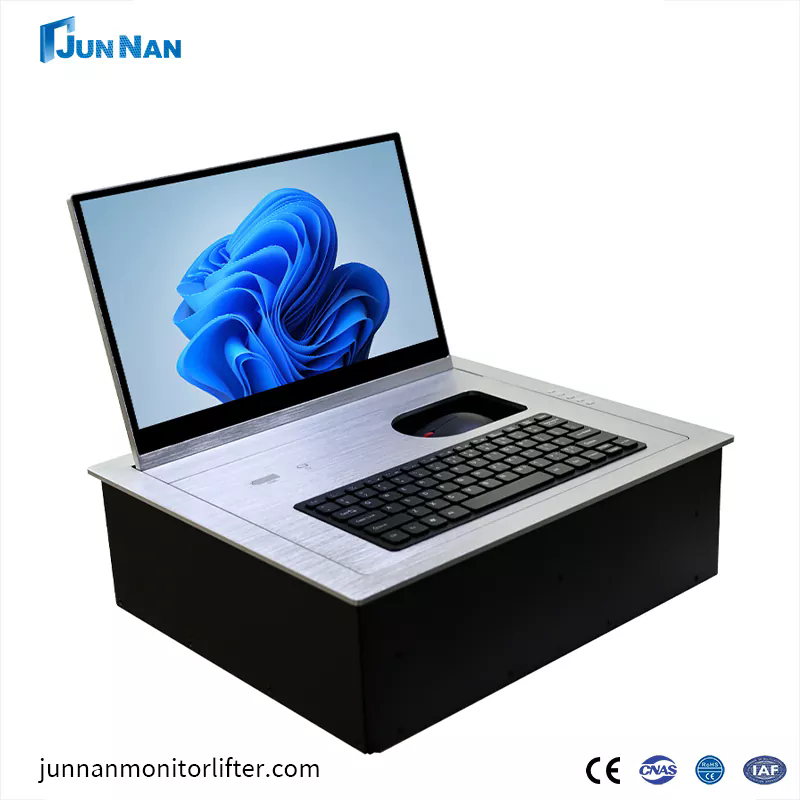
This guide explains how Desktop Flip Displays work, their major advantages, common applications, key purchasing considerations, maintenance recommendations, and why choosing a professional manufacturer like Guangzhou junnan helps ensure long-term reliability and excellent user experience.
Table of Contents
- What Is a Desktop Flip Display?
- How Does a Desktop Flip Display Work?
- Common Problems with Traditional Monitor Setups
- Major Benefits of Desktop Flip Displays
- Typical Application Scenarios
- Desktop Flip Display vs Traditional Monitor Installation
- How to Choose the Right Desktop Flip Display
- Maintenance Tips
- Frequently Asked Questions
- Conclusion
What Is a Desktop Flip Display?
A Desktop Flip Display is an intelligent display system designed to integrate seamlessly into conference tables, executive desks, classrooms, training rooms, government facilities, and collaborative workspaces. Instead of remaining permanently visible, the monitor is hidden beneath the tabletop and automatically flips upward when activated.
The lifting mechanism is driven by a precision motor and controlled electronically, allowing users to deploy or retract the monitor with a simple button press, touch panel, or centralized control system.
Unlike conventional desktop monitors that occupy valuable workspace, a Desktop Flip Display creates a cleaner, more organized environment while protecting the display when not in use.
How Does a Desktop Flip Display Work?
Understanding the operating principle helps buyers appreciate why these systems have become increasingly popular across professional environments.
- The display remains hidden beneath the desktop.
- A user presses a control button or activates the central control system.
- The built-in motor begins rotating the display upward.
- The monitor reaches its preset viewing angle.
- The system locks securely during operation.
- After use, the monitor automatically returns beneath the desktop.
Most modern Desktop Flip Displays include intelligent safety features that monitor movement, reduce vibration, and protect internal components throughout the lifting process.
Common Problems with Traditional Monitor Setups
Many organizations continue using conventional desktop monitors without realizing the long-term disadvantages they create.
| Challenge | Impact |
|---|---|
| Limited desk space | Documents and laptops compete with monitors for workspace. |
| Visible cable clutter | Creates an unprofessional appearance. |
| Poor meeting flexibility | Screens obstruct face-to-face communication. |
| Difficult cleaning | Dust accumulates behind fixed displays. |
| Security concerns | Displays remain exposed when not in use. |
| Limited aesthetics | Traditional installations reduce modern office appeal. |
These challenges become even more noticeable in executive boardrooms, training facilities, government meeting rooms, and high-end conference centers where appearance and efficiency matter equally.
Major Benefits of Desktop Flip Displays
A professionally designed Desktop Flip Display solves multiple workplace challenges while improving efficiency and user experience.
1. Maximizes Workspace
When the monitor is hidden, the entire desktop becomes available for paperwork, collaboration, presentations, or creative activities.
2. Creates a Clean Appearance
Hidden displays and concealed wiring contribute to a modern, minimalist meeting environment that leaves a positive impression on clients and visitors.
3. Improves Collaboration
Participants can maintain direct eye contact without monitors acting as physical barriers during discussions.
4. Protects the Display
When retracted beneath the tabletop, the monitor is protected from accidental impacts, dust, spills, and unauthorized handling.
5. Supports Intelligent Conference Systems
Many systems integrate with central meeting control platforms, allowing synchronized operation alongside microphones, cameras, lighting, and presentation equipment.
6. Enhances Professional Image
Modern meeting environments increasingly reflect an organization's technological capability. Hidden display systems help demonstrate innovation and attention to detail.
Typical Application Scenarios
Desktop Flip Displays are suitable for numerous industries.
| Industry | Typical Use |
|---|---|
| Corporate Offices | Executive conference rooms |
| Government | Meeting halls and decision centers |
| Education | Smart classrooms and training centers |
| Healthcare | Medical conference rooms |
| Finance | Command centers and trading rooms |
| Hospitality | Luxury conference facilities |
| Broadcasting | Control rooms |
| Military | Command and monitoring centers |
Desktop Flip Display vs Traditional Monitor Installation
| Feature | Desktop Flip Display | Traditional Monitor |
|---|---|---|
| Desk Space | Excellent | Limited |
| Appearance | Modern | Standard |
| Cable Management | Hidden | Visible |
| Equipment Protection | High | Average |
| Meeting Flexibility | Excellent | Limited |
| Automation | Available | Minimal |
| Technology Integration | High | Basic |
How to Choose the Right Desktop Flip Display
Selecting the ideal system requires more than simply choosing a screen size.
- Select the appropriate display size for the meeting table.
- Evaluate motor quality and operating noise.
- Check lifting speed and stability.
- Confirm compatibility with conference systems.
- Review installation requirements.
- Verify available input interfaces.
- Ensure long-term technical support.
- Choose manufacturers with proven production experience.
Reliable suppliers also provide customization options for different table structures, monitor sizes, control methods, and finish colors.
Guangzhou junnan focuses on intelligent conference furniture solutions and develops Desktop Flip Display systems designed for durability, smooth operation, and seamless integration into modern meeting environments. Their product solutions are widely suitable for conference rooms, education facilities, government projects, and commercial installations requiring professional performance and elegant appearance.
Maintenance Tips
Routine maintenance helps maximize equipment lifespan.
- Keep the lifting mechanism free from dust.
- Avoid placing excessive weight above the installation area.
- Inspect electrical connections regularly.
- Clean the display using microfiber cloths.
- Do not interrupt lifting movement.
- Follow recommended operating cycles.
- Schedule periodic professional inspections.
Preventive maintenance significantly reduces unexpected downtime while ensuring smooth and quiet operation for years.
Frequently Asked Questions
Q1. Can Desktop Flip Displays support different monitor sizes?
Yes. Most manufacturers offer multiple display sizes and customized dimensions to accommodate different conference table designs.
Q2. Are these systems noisy during operation?
High-quality motor systems operate quietly with minimal vibration, making them suitable for executive meetings and classrooms.
Q3. Can they integrate with conference control systems?
Yes. Many models support centralized control, allowing synchronized operation with microphones, projectors, cameras, and room automation systems.
Q4. Are Desktop Flip Displays safe?
Professional products include safety mechanisms such as overload protection, precise positioning, and stable lifting control to ensure reliable daily operation.
Q5. Are customized solutions available?
Absolutely. Manufacturers can customize screen size, control methods, lifting angle, table dimensions, and interface configurations according to project requirements.
Conclusion
A Desktop Flip Display is far more than a hidden monitor—it is an intelligent workspace solution that enhances productivity, protects valuable equipment, improves collaboration, and creates a cleaner professional environment. As organizations continue investing in smart meeting spaces, integrated display technology has become an important part of efficient workplace design.
Whether you are upgrading a corporate boardroom, building a government command center, designing a university classroom, or equipping a premium conference facility, choosing a reliable Desktop Flip Display can significantly improve both functionality and aesthetics.
Guangzhou junnan is committed to providing innovative Desktop Flip Display solutions that combine intelligent engineering, reliable performance, elegant design, and flexible customization for modern professional environments.
Ready to upgrade your conference room with a smarter Desktop Flip Display solution? Guangzhou junnan offers professional products, customized designs, and dependable technical support to meet your project requirements. Contact us today to discuss your application and discover the ideal solution for your workspace.